データフレームの特徴をもっと早く掴みたい ~ ハドリーへの挑戦
探索的なデータ分析 (Explore Data Analysis: EDA)を行う際は、データの要約や欠損の有無の確認、可視化が欠かせない作業となります。
特に可視化は、データのもつ性質や関係を表現するのに大変役立ちます。一方で、可視化に用いた図はコードとは別に保存する必要があったり、作図のためのコードを書いたりと、面倒な側面もあります。
… きちんとした作図は面倒だけどデータの性質や欠損について把握したい。そんな時にはコンソール上での可視化を試しましょう。そのためのパッケージをHadley Wickhamが開発しています。
https://github.com/hadley/precis
Rにはそもそも、オブジェクトの情報を要約してくれるsummary()関数があるのですが、この precisパッケージは、それを置き換えるような設計を目指しているそうです。早速使ってみましょう。
# githubinstall::githubinstall('precis')
library(precis)
現在precisが提供するのは、それぞれベクトルとデータフレームの要約を行う2つの関数、precis_v()とprecis()です。precis()が返す個々の情報は、precis_v()によるものです。
データフレームにprecis()を実行すると、次のような出力が行われます。summary()と異なり、返り値もデータフレームであるのが特徴で、データフレームの変数名を示すname、変数のデータ型を示すtype、そして変数をベクトルとして評価した時の要約した情報がprecis列に格納されています。
precis(iris)
## # data.frame [150 x 5]
##           name  type                                     precis
##          <chr> <chr>                                      <chr>
## 1 Sepal.Length   dbl            4.3 [  5.1 (  5.8)   6.4]   7.9
## 2  Sepal.Width   dbl            2.0 [  2.8 (  3.0)   3.3]   4.4
## 3 Petal.Length   dbl           1.00 [ 1.60 ( 4.35)  5.10]  6.90
## 4  Petal.Width   dbl            0.1 [  0.3 (  1.3)   1.8]   2.5
## 5      Species  fctr setosa (50) versicolor (50) virginica (50)
precis(mtcars)
## # data.frame [32 x 11]
##     name  type                            precis
##    <chr> <chr>                             <chr>
## 1    mpg   dbl  10.4 [ 15.4 ( 19.2)  22.8]  33.9
## 2    cyl   dbl               4 (11) 6 (7) 8 (14)
## 3   disp   dbl  71.1 [121.0 (196.0) 334.0] 472.0
## 4     hp   dbl    52 [   96 (  123)   180]   335
## 5   drat   dbl  2.76 [ 3.08 ( 3.70)  3.92]  4.93
## 6     wt   dbl  1.51 [ 2.54 ( 3.32)  3.65]  5.42
## 7   qsec   dbl  14.5 [ 16.9 ( 17.7)  18.9]  22.9
## 8     vs   dbl                     0 (18) 1 (14)
## 9     am   dbl                     0 (19) 1 (13)
## 10  gear   dbl               3 (15) 4 (12) 5 (5)
## 11  carb   dbl     1 [    2 (    2)     4]     8
precis列の値は、対象の変数のデータ型に応じて異なります。例えば数値であれば、最小値、第一四分位、中央値、第三四分位、最大値の値です(summary()で得られる情報と同じ)。最大値と最小値の間が[括弧になっており、中央値については(括弧が使われているのでわかりやすいですね。また、因子型や文字列型については、順位、カウント値の情報が出力されます。
precis()の良い点は、これに加えて引数histogramでTRUEを指定した際に、数値データのヒストグラムをコンソール上で描画してくれるところです。例えば次の例では、hist(iris$Sepal.Length)とせずともデータの分布が掴めるので、偏りがあるとか正規分布に近い、といったことが把握しやすいという利点になります。
precis(iris, histogram = TRUE)
## # data.frame [150 x 5]
##           name  type                                     precis
##          <chr> <chr>                                      <chr>
## 1 Sepal.Length   dbl              4.3 ▂▂▃▇▇▃▇▇▃▅▇▃▅▂▂▁▁▂▁   7.9
## 2  Sepal.Width   dbl                     2.0 ▁▁▂▅▇▅▃▂▂▁▁▁   4.4
## 3 Petal.Length   dbl                     1.0 ▇▂▁▁▁▂▃▃▃▃▁▁   6.9
## 4  Petal.Width   dbl                    0.1 ▇▃▁▁▂▂▅▃▃▂▂▂▁   2.5
## 5      Species  fctr setosa (50) versicolor (50) virginica (50)
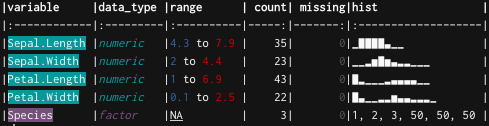
… でも、それだけでなく、欠損値やカウントの数を知りたいんだ!という気持ちが改造したのが次のuncover()関数になります。gistからソースコードを引っ張って来ることで利用可能になります。
devtools::source_gist("f275260bbd1da5f613241458c43adb2d",
    filename = "uncover.R")
uncover(mtcars)
### A tibble: 11 x 6
##   variable data_type          range count missing           hist
##      <chr>     <chr>          <chr> <int>   <int>          <chr>
## 1      mpg   numeric   10.4 to 33.9    25       0   ▂▁▇▃▅▅▂▂▁▁▂▂
## 2      cyl   numeric         4 to 8     3       0       ▅▁▁▃▁▁▁▇
## 3     disp   numeric    71.1 to 472    27       0      ▅▇▃▁▃▃▃▁▂
## 4       hp   numeric      52 to 335    22       0         ▇▇▃▃▁▁
## 5     drat   numeric   2.76 to 4.93    22       0   ▂▂▇▂▁▅▇▃▂▁▁▁
## 6       wt   numeric 1.513 to 5.424    29       0       ▃▃▃▇▅▁▁▂
## 7     qsec   numeric   14.5 to 22.9    30       0      ▁▂▂▇▃▂▁▁▁
## 8       vs   numeric         0 to 1     2       0     ▇▁▁▁▁▁▁▁▁▅
## 9       am   numeric         0 to 1     2       0     ▇▁▁▁▁▁▁▁▁▅
##10     gear   numeric         3 to 5     3       0     ▇▁▁▁▅▁▁▁▁▂
##11     carb   numeric         1 to 8     6       0 ▅▇▁▂▁▇▁▁▁▁▁▁▁▁
uncover(ggplot2::diamonds)
### A tibble: 10 x 6
##   variable      data_type         range count missing                 hist
##      <chr>          <chr>         <chr> <int>   <int>               <list>
## 1    carat        numeric   0.2 to 5.01   273       0            <chr [1]>
## 2      cut ordered_factor Fair to Ideal     5       0 <data.frame [5 x 2]>
## 3    color ordered_factor        D to J     7       0 <data.frame [7 x 2]>
## 4  clarity ordered_factor      I1 to IF     8       0 <data.frame [8 x 2]>
## 5    depth        numeric      43 to 79   184       0            <chr [1]>
## 6    table        numeric      43 to 95   127       0            <chr [1]>
## 7    price        integer  326 to 18823 11602       0            <chr [1]>
## 8        x        numeric    0 to 10.74   554       0            <chr [1]>
## 9        y        numeric     0 to 58.9   552       0            <chr [1]>
##10        z        numeric     0 to 31.8   375       0            <chr [1]>
range列はprecis()同様、変数のデータの幅を示すものですが、こちらは最小値と最大値しかわかりません。順位のある因子型は順位の並びで最小・最大のものが出力されるようになっています。
また、変数が数値であればprecis()と同じくヒストグラムを出力します。が、因子型や文字列が含まれるデータでは次のようにhist列の情報はリストカラムとして格納されます。これを取り出すには、dplyr::filterでデータ型の制限をし、tidyr::unnest()でリストカラムを解除してください。
uncover(ggplot2::diamonds) %>% dplyr::filter(data_type %in%
    c("numeric", "integer")) %>% tidyr::unnest()
### A tibble: 7 x 6
##  variable data_type        range count missing         hist
##     <chr>     <chr>        <chr> <int>   <int>        <chr>
##1    carat   numeric  0.2 to 5.01   273       0  ▇▇▅▁▁▁▁▁▁▁▁
##2    depth   numeric     43 to 79   184       0     ▁▁▁▁▇▁▁▁
##3    table   numeric     43 to 95   127       0  ▁▁▂▇▁▁▁▁▁▁▁
##4    price   integer 326 to 18823 11602       0   ▇▃▂▁▁▁▁▁▁▁
##5        x   numeric   0 to 10.74   554       0  ▁▁▁▁▇▇▇▂▁▁▁
##6        y   numeric    0 to 58.9   552       0 ▃▇▁▁▁▁▁▁▁▁▁▁
##7        z   numeric    0 to 31.8   375       0      ▇▁▁▁▁▁▁
uncover(ggplot2::diamonds) %>% dplyr::filter(data_type %in%
    c("ordered_factor")) %>% tidyr::unnest()
### A tibble: 20 x 7
##   variable      data_type         range count missing value.Var1 value.Freq
##      <chr>          <chr>         <chr> <int>   <int>      <chr>      <int>
## 1      cut ordered_factor Fair to Ideal     5       0       Fair       1610
## 2      cut ordered_factor Fair to Ideal     5       0       Good       4906
## 3      cut ordered_factor Fair to Ideal     5       0  Very Good      12082
## 4      cut ordered_factor Fair to Ideal     5       0    Premium      13791
## 5      cut ordered_factor Fair to Ideal     5       0      Ideal      21551
## 6    color ordered_factor        D to J     7       0          D       6775
## 7    color ordered_factor        D to J     7       0          E       9797
## 8    color ordered_factor        D to J     7       0          F       9542
## 9    color ordered_factor        D to J     7       0          G      11292
##10    color ordered_factor        D to J     7       0          H       8304
##11    color ordered_factor        D to J     7       0          I       5422
##12    color ordered_factor        D to J     7       0          J       2808
##13  clarity ordered_factor      I1 to IF     8       0         I1        741
##14  clarity ordered_factor      I1 to IF     8       0        SI2       9194
##15  clarity ordered_factor      I1 to IF     8       0        SI1      13065
##16  clarity ordered_factor      I1 to IF     8       0        VS2      12258
##17  clarity ordered_factor      I1 to IF     8       0        VS1       8171
##18  clarity ordered_factor      I1 to IF     8       0       VVS2       5066
##19  clarity ordered_factor      I1 to IF     8       0       VVS1       3655
##20  clarity ordered_factor      I1 to IF     8       0         IF       1790
uncover(datasets::Titanic) %>% dplyr::filter(data_type %in%
    c("numeric", "integer")) %>% tidyr::unnest()
### A tibble: 1 x 6
##  variable data_type    range count missing           hist
##     <chr>     <chr>    <chr> <int>   <int>          <chr>
##1        n   numeric 0 to 670    22       0 ▇▂▁▁▁▁▁▁▁▁▁▁▁▁
コードを書いてみて思ったのが、precis::precis()でいいじゃん…ということでした。いやでもuncover()も役立つ時があるはず!(ハドリーへの挑戦と思ってこの思い出は胸にしまっておきます)
いやあ、欲を言えばこういうことがしたいんですよね(次回に続く…)